


A Printmystuffsg Guide for Singapore Business Owners
When you’re designing anything from menus to packaging, business cards to banners, you’re not just creating a visual. You’re creating a brand experience—and the colors you choose can make or break that experience.
This is why understanding CMYK vs RGB is not just a design topic—it’s a business decision.
At Print My Stuff, we help business owners in Singapore turn their brand ideas into consistent, high-quality print outcomes without confusion, compromise, or guesswork. So if you’re designing your own materials, this guide is for you.
What Is the Difference Between RGB And CMYK?
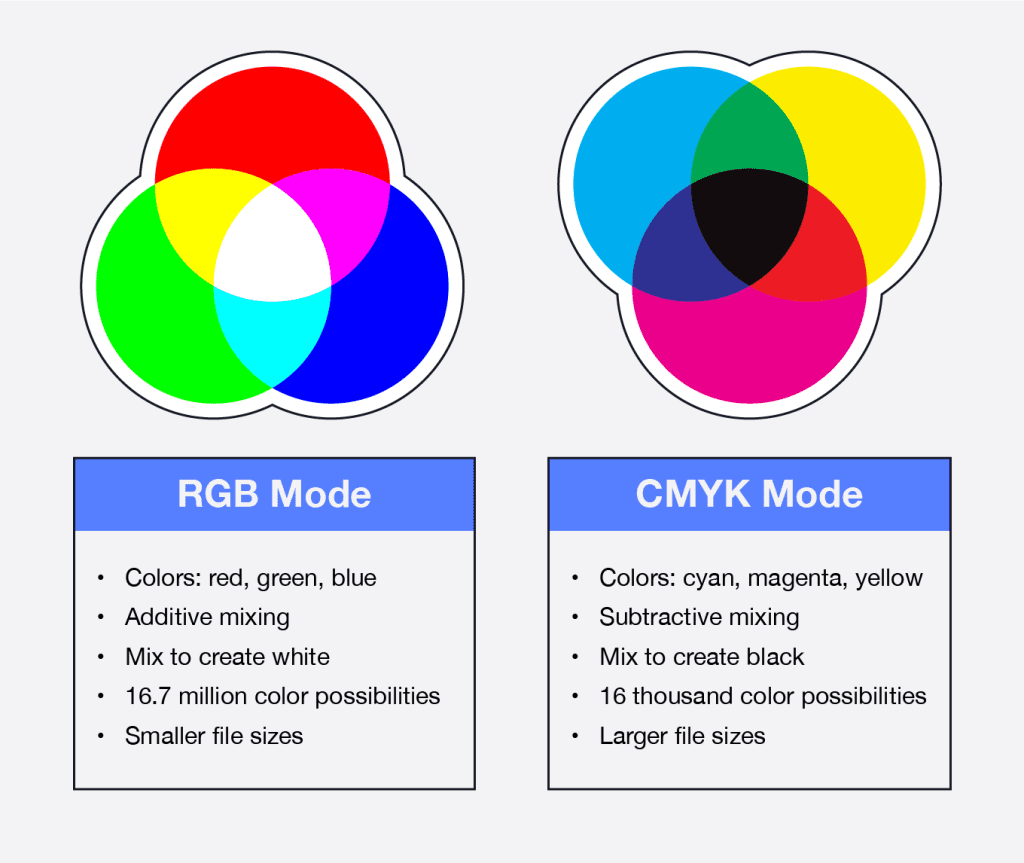
There is a big difference between RGB and CMYK color mixing modes in terms of what they’re used for. For digital designs (like web, TV, or phone files), RGB is the primary color mode, while CMYK is used for printed designs (such as T-shirts, flyers, or business cards).
Apart from this main difference, RGB and CMYK color modes also differ in their primary colors, mixing modes, and maximum color yields. Colors are created by light through an additive process called RGB. White light is created by combining red, green, and blue primary colors.
CMYK is the opposite of RGB. As a result, pigment creates the color and mixing is a subtractive process. Black is made up of the primary colors cyan, magenta, and yellow. In “CMYK,” black represents the “K.”
An RGB print has 16.7 million color combinations, whereas a CMYK print has 16,000 colors. Even though RGB files have more color options, they are usually smaller than CMYK files.
What Are CMYK and RGB?
RGB (Red, Green, Blue)
RGB is a digital color model used for screens—like phones, laptops, TVs, and digital ads.
-
Used for: social media posts, websites, digital banners, email graphics
-
Best for: glowing, vibrant colors
-
Not ideal for print: because screens use light to display colors, while print uses ink
CMYK (Cyan, Magenta, Yellow, Black)
CMYK is a print color model used for physical materials.
-
Used for: business cards, brochures, packaging, posters, banners
-
Best for: accurate and consistent print colors
-
More realistic for print: because it uses ink and physical materials
The Main Difference
RGB = Light-Based Colors (Screen)
CMYK = Ink-Based Colors (Print)
If you design in RGB and print it in CMYK, your colors will likely appear duller, darker, or different than what you see on screen.
This is why DIY designs often look different when printed.

The Importance of Using the right color mode
Having accurate color representation is crucial for print purposes. Converting RGB to CMYK often results in color shifts, sometimes even drastic ones. It’s important to note that a design originally in CMYK converted to RGB yields the same outcome.
Moreover, certain colors cannot be faithfully reproduced in one color mode over the other. Neon colors, for instance, cannot be printed with CMYK inks, but they can be displayed accurately on a computer monitor using RGB.
To achieve effective design outcomes, it is essential to choose the appropriate color mode for your print project and workflow. This ensures that the finished print product displays accurate colors and delivers the best possible results.
Why This Matters for Singapore Business Owners
If you run a retail shop, café, or creative business, your brand is built on consistency. Your brand color must look the same on:
-
your shop signage
-
your menu
-
your packaging
-
your business cards
-
your social media
When your printed materials don’t match your digital assets, it looks like your brand is inconsistent or unprofessional.
And inconsistent branding hurts more than no branding.
Why CMYK Color mode is more suitable for Print Purposes?
Accurate color mode is crucial for print purposes. CMYK, consisting of cyan, magenta, yellow, and black, is the color model commonly used in conventional printing. The “K” in CMYK stands for black, which acts as the key color, setting the foundation for the design while other ink colors are layered on top. Cyan, magenta, and yellow are secondary colors in this model.
By employing the appropriate CMYK color mode, it is possible for printers to achieve faithful color reproduction, ensuring the final printed output accurately reflects the intended design. This meticulous control over ink combinations allows for precise color representation and consistent results in printed materials. Understanding the significance of CMYK and its color components is vital for achieving the desired visual impact in print media.
Why you should not use RGB Color mode for Print Purposes?
Using RGB color mode for print purposes may lead to undesirable outcomes. RGB, representing Red, Green, and Blue, is primarily used for displaying digital images on screens such as monitors, TVs, and phones. Unlike CMYK, which follows a subtractive model, RGB operates on an additive model.
When RGB images are printed using CMYK inks, color conversions occur, potentially resulting in color shifts and inaccuracies. The color range and gamut in RGB far exceed what can be reproduced with CMYK inks, leading to limitations and a loss of vibrancy in printed materials.
To ensure accurate and faithful color representation in print, it is essential to work with the appropriate color mode, such as CMYK, which is specifically designed for the subtractive process of printing.
What Happens If You Ignore CMYK vs RGB?
You risk:
-
Brand inconsistency
-
Bad first impression
-
Low perceived quality
-
Wasted budget on reprints
-
Confusing visuals across online & offline channels
In short:
Inconsistent colors reduce trust.
If your brand doesn’t look consistent across all touchpoints, customers might subconsciously question your reliability.
A Simple DIY Rule
Design for Print in CMYK
If your final output is physical printing, always start in CMYK.
If you must design in RGB (because your software defaults to RGB), convert to CMYK before printing and check for color shifts.
The Differences Between CMYK and RGB
Having discussed how RGB and CMYK work, let’s consider some of their main differences.
1. The Color Gamut
CMYK and RGB differ primarily in their color gamut or number of colors they can display.
Because it uses a small set of inks (cyan, magenta, yellow, and black), CMYK can only produce a limited number of colors. The proportions of these inks are varied to create different colors.
Due to the fact that RGB uses light instead of ink, it can produce a wider range of colors. The intensity of red, green, and blue light can be varied to create millions of colors.
So, What is a color gamut?
Color gamut refers to the range of colors that can be displayed by a color mode. In comparison with CMYK, the RGB color gamut is much larger.
2. The Default Color Mode
Whenever you open a design program like Adobe Photoshop or Illustrator, the default color mode is used.
The default color mode for most design programs is RGB. The default color mode for a new canvas is RGB.
Some programs, however, use CMYK as the default color mode. CorelDRAW, for example, use the CMYK color mode by default.
3. The Printing Process
The printing process is the main reason for CMYK’s existence. For printing, CMYK is the color mode used – cyan, magenta, yellow, and black ink are used.
Printing the colors in the right order is also important. The cyan image is always printed first, then a magenta image, then a yellow image, and finally a black image. It is called the “Four-Color Process.”
4. The Output Device
A major difference between RGB and CMYK is the output device. It displays or prints your design. For CMYK, the output device is printed products, while for RGB, the output device is displays.
Exceptions do exist, however.
5. Brighter Colors
Colors in RGB mode tend to be brilliant. Ink is naturally less vibrant than light, since RGB uses light to create color. Colors appear more vibrant on digital devices because they have backlit screens.
By comparison, CMYK colors tend to be slightly muted because they use inks instead of light. Muted colors aren’t necessarily bad – some of the best designs have muted colors.
How to Set the Color Mode in Photoshop
Adobe Photoshop makes changing the color mode very easy. Follow these simple steps:
- Open your image in Photoshop.
- Click on “Image” in the menu bar at the top of the screen.
- Hover over “Mode.”
- Click on the color mode you want to use (RGB or CMYK).
How to Set the Color Mode in Illustrator
In Adobe Illustrator, you can set the color mode just as easily. Follow these simple steps:
- Open your image in Illustrator.
- Click on “File” in the menu bar at the top of the screen.
- Hover over “Document Color Mode.”
- Click on the color mode you want to use (RGB or CMYK).
How to Set the Color Mode in Canva, learn here [Link]
Converting between color modes can sometimes result in color shifts and loss of color data. CMYK and RGB cannot accurately depict all colors.
In order to create a print-ready design, you should start with CMYK. Consequently, all the colors in your design will be accurately represented in the final print.
When RGB Is Still OK
RGB is still perfect when your final output is digital only, such as:
-
social media posts
-
website banners
-
email newsletters
-
digital ads
How Printmystuffsg Helps You Avoid Color Mistakes
At Print My Stuff, we are not just a printing vendor. We are a branding partner.
Here are the top ways we help you:
1. Brand-First Consultation
We don’t just print your file.
We advise on materials, finishes, and color choices based on your brand identity, not just your file.
2. Consistent Print Standards
We ensure color consistency across all touchpoints, so your brand stays cohesive.
3. Multi-Country Production Options
We can print in Singapore, Malaysia, and Korea, giving you more flexibility and better finishes.
4. Business-Ready Printing
Our solutions are designed for real-world use: durability, speed, and quality.
5. Long-Term Print Partnership
We support your brand beyond one-off jobs.
We help you build consistent visual identity across all printed assets.
CMYK vs RGB Checklist for DIY Designers
Use this checklist to avoid costly mistakes:
✅ If printing physical materials → use CMYK
✅ If digital-only → use RGB
✅ Always convert RGB to CMYK before printing
✅ Check color profiles (especially if you’re using Canva or Adobe)
✅ Consult a printing expert if your brand color is crucial
Can Inconsistent Branding Hurt a Business More Than No Branding?
Yes—because inconsistent branding creates confusion.
When a customer sees different colors, fonts, or quality across your printed materials, they may feel:
-
“Is this business reliable?”
-
“Do they care about details?”
-
“Will the product/service be consistent too?”
No branding can be neutral.
Inconsistent branding creates a negative impression.
A strong brand is built on consistent visual identity—especially across physical materials.
Businesses who cares about Brand consistency:
If you’re a business owner in Singapore and you care about brand consistency, don’t let color mismatches ruin your brand identity.
At Print My Stuff, we provide:
-
professional consultation
-
color accuracy and consistency
-
print-ready advice
-
premium-yet-affordable printing
-
long-term brand partnership
Get in touch with us before your next print job, and we’ll make sure your colors and brand identity stay perfect across every touchpoint.

FAQ
Can I print RGB images?
You can print RGB images. Before your image is printed, the colors will be converted to CMYK. So, there’s a chance that some of the colors in your image will be slightly different in the final print.
Should I convert an RGB image to CMYK before printing?
Converting RGB images to CMYK is usually a good idea before printing. Using this method, you can be sure that your final print accurately portrays all of the colors in your image.
There’s always a chance that some colors will appear differently after the conversion. The best way to achieve ideal color accuracy and consistency is by starting in CMYK from the beginning, especially if you’re working on a very color-sensitive design.
We have a dedicated Telegram channel that will allow you to receive updates, print offers, and links to our latest print service discount! Join us now: printdeals
______ – ______ – ______ – ______ – ______
More than print. We brand.

Whether you’re a startup, evolving SME, or scaling brand looking for a fresh perspective, Brandmystuff is here to craft an identity that works across print, digital, and experience. Talk to us!